
Buying Guide, Cost Analysis
Xerox AltaLink C8155 Unboxing & First Impressions — A Practical Walkthrough for Hong Kong IT Teams
Sep
Xerox AltaLink C8155 Unboxing & First Impressions
A Practical Walkthrough for Hong Kong IT Teams Evaluating an Enterprise A3 Colour Multifunction Printer
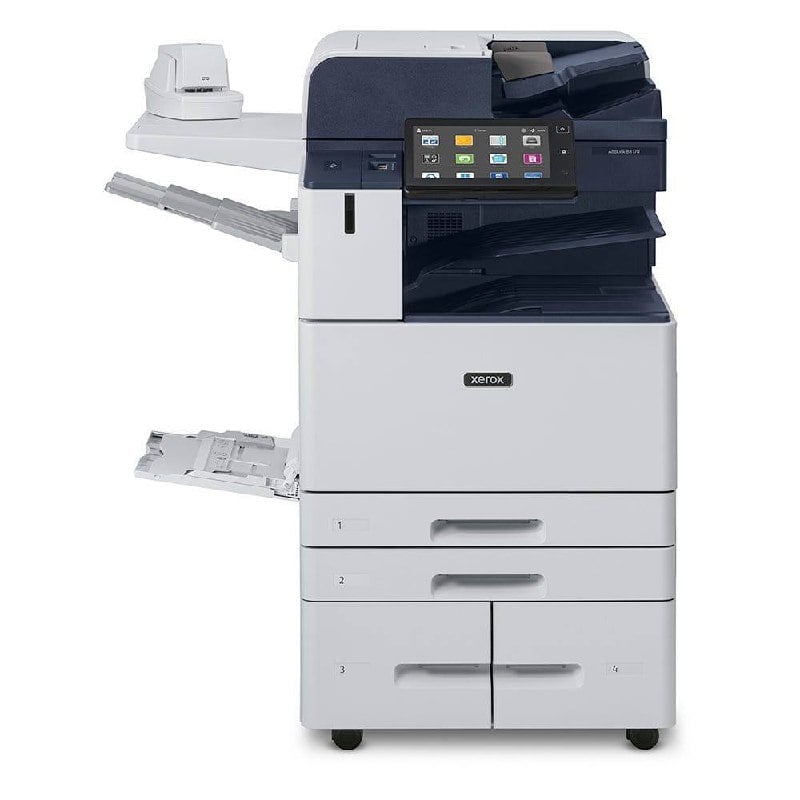
The Xerox AltaLink C8155 arrived at our service centre in Mong Kok last Tuesday morning — a 132 kg machine (286 lb) in a single wooden crate. By mid-afternoon, our engineering team had it out of the crate, onto its designated floor pad, and printing a colour test page. This article walks through what actually happened during the unboxing and first-day setup, with the kind of practical detail that vendor brochures tend to skip: where the pallet bolts hide, how the DADF travels in transit, what toner ships pre-installed, and which configuration choices matter most for a typical Hong Kong office environment.
For IT managers considering the C8155 for a finance back-office, a legal firm document archive, or a marketing team’s proofing workflow, this review covers the unboxing experience, physical footprint, paper handling, control panel operation, security defaults, and our first-print impressions.
What’s in the Box — and What Isn’t
The C8155 ships in standard Xerox packaging: a reinforced wooden crate on a single pallet, with the printer body strapped to a wooden baseboard. Internal packaging is substantial — foam inserts protect the imaging unit, the document feeder ships in its own cardboard sleeve, and toner cartridges are boxed separately inside the main cavity.
Pre-installed items
- Imaging unit (drum + developer assembly) — already seated inside the machine, with protective blue spacers that must be removed before first power-on
- Print cartridges (toner) — one each of CMYK, factory-sealed, with approximately 50% starter fill (Xerox “starter” toner, not full-capacity)
- Power cable — IEC C13 to local 3-pin plug, rated for Hong Kong 220V / 50Hz supply
- Setup documentation — multilingual Quick Use Guide, safety sheet, registration card
- Software DVD — print drivers and ConnectKey utility (most users will download the current driver from xerox.com instead)
Not in the box — order separately
- Wireless network kit (optional) — if you want Wi-Fi Direct or 802.11ac, this must be added; base configuration is Ethernet-only
- Fax module (one-line or two-line options) — for offices that still need PSTN fax; not required for IP fax / LAN fax workflows
- RFID card reader — pull-print authentication requires this; many Hong Kong offices use PIN codes on the touchscreen instead
- Additional paper trays — the four-tray base module ships standard; the High Capacity Feeder (3,000 sheets, A4 only) and Envelope Tray are separate
Unboxing Step-by-Step
1Position the pallet. Use a pallet jack or four-person lift to move the crate from the delivery vehicle into your print room. The crate is roughly 1.3 m wide × 0.9 m deep × 1.5 m tall. Leave at least 1 m clearance around the final machine location for service access and ventilation.
2Remove the outer crate. Unscrew the four side panels and lift the lid straight up. The cardboard sleeve on top protects the document feeder — keep this for re-installation if you ever need to ship the machine.
3Detach the printer from the wooden baseboard. There are two pallet bolts on each side (eight total), plus a metal retaining bracket at the front. These are not standard hex bolts — you will need a 13 mm socket wrench or a flat-blade screwdriver, depending on the production batch. Plan for this: many IT teams don’t realise the baseboard bolts need an unusual driver.
4Lift the printer off the baseboard. The C8155 base configuration weighs 129.5 kg (286 lb). This is a four-person lift, minimum. For Hong Kong office buildings without service lift access above the ground floor, plan to disassemble the machine (separate the optional finisher if fitted, remove the paper trays) before moving it up stairs. The main body alone is still ~80 kg.
5Remove the protective blue spacers. Three spacers (one on each side of the imaging area, one on the front door latch) hold internal components in place during transit. Open the front door, remove all blue spacers, close the door. Skipping this step causes paper jams on the first print job.
6Reinstall the document feeder and toner cartridges. The DADF slots back into the top of the machine via two side rails. Toner cartridges drop into the front cavity — each is colour-coded and only fits one slot. No tools required.
7Connect power and network. Plug the IEC C13 into a dedicated 20A circuit (the C8155 draws up to 806 W running, 72 W standby). Connect Ethernet to your office LAN. The first boot takes approximately 4.5 seconds from standby, or up to 85 seconds from cold start.
8Initial setup wizard. The 10.1-inch colour touchscreen walks you through language, time zone, administrator password, network configuration (DHCP or static IP), and SNMP community strings. Plan 15-20 minutes for the initial setup, plus another 10 minutes if you’re integrating Active Directory or LDAP authentication.
Physical Footprint and Office Placement
The C8155 base configuration occupies 620 mm wide × 723 mm deep × 1,130 mm tall — a footprint roughly the size of a standard office desk drawer unit. With the Integrated Office Finisher (the most common configuration for Hong Kong offices), the depth grows to 793 mm and the height to 1,169 mm. With the optional BR Booklet Maker Finisher + C-fold/Z-fold unit + HCF, the machine can stretch to 2,361 mm wide — too wide for most offices, and only relevant for in-house print rooms.
For reference, 65 dB(A) is roughly the sound of a normal conversation at 1 m distance — noticeable in a quiet office but unobtrusive in a typical open-plan environment with background HVAC. The standby level of 43 dB(A) is inaudible in normal office conditions.
Document Feeder and Paper Handling
The C8155 uses a Single-Pass Duplex Automatic Document Feeder (DADF) — both sides of a two-sided original are scanned in one pass, at speeds up to 82 ppm simplex / 141 ipm duplex (200 dpi). For an office scanning a 100-page contract stack, this is roughly 45 seconds — about half the time of a conventional reversing ADF.
The DADF holds 130 sheets, with originals from 85 × 125 mm (postcard size) up to 297 × 432 mm (A3). Heavy stock up to 200 gsm is supported. The feed rollers are user-replaceable — a 30-second swap, no tools — which matters for high-volume scanning environments.
The four paper trays in the base configuration break down as follows:
| Tray | Capacity | Sizes | Best for |
|---|---|---|---|
| Tray 1 (Bypass) | 100 sheets | 89 × 98 mm – 320 × 1,320 mm (custom) | Envelopes, labels, heavy cardstock, banner paper |
| Tray 2 | 520 sheets | 140 × 182 mm – 297 × 432 mm (A5 – A3) | Standard office paper, A4 default |
| Tray 3 | 520 sheets | 140 × 182 mm – SRA3 (320 × 450 mm) | Letterhead, second paper type |
| Tray 4 (Tandem) | 2,000 sheets | A4 / Letter only, long-edge feed | Main plain-paper reservoir — most office printing |
For Hong Kong offices that regularly print on three paper types (e.g. A4 plain, A3 colour proofs, and pre-printed letterhead), we recommend setting Tray 1 (bypass) for occasional media, Tray 2 for A3 / colour proofs, and Trays 3-4 (tandem) for A4 plain paper — total 3,140 sheets standard capacity.
The 10.1-Inch Touchscreen — What You Actually Use It For
Xerox markets the AltaLink’s touchscreen as “tablet-like,” which sounds like marketing fluff until you actually use it. The interface is responsive, supports gesture control (swipe to scroll, pinch to zoom on map-based previews), and customises per user when integrated with Active Directory. The 1,280 × 800 resolution is sharp enough that you can preview a scanned document at near-full size before sending it to email.
In a typical office day, the touchscreen is used for five main functions:
- Walk-up copy — single or duplex, reduction / enlargement, ID card copy (both sides onto one page), staple output
- Scan to email — type or select recipient, choose PDF / TIFF / JPG, single or multi-page
- Print from USB — PDF, TIFF, JPEG, Office documents (with optional OCR kit)
- Secure print release — type your PIN to release a queued job (when Pull Print is configured)
- Fleet management — toner status, paper levels, error codes, usage reports
For staff who are comfortable with smartphones, the touchscreen requires zero training. For staff who have only ever used a 1990s photocopier with physical buttons, allow 5-10 minutes of orientation the first time they use it.
Print Quality and Speed — First Impressions
The C8155 prints at 55 ppm in both colour and black-and-white, at up to 1,200 × 2,400 dpi resolution. For comparison, the smaller C8130 prints at 30 ppm, the C8135 at 35 ppm, and the C8145 at 45 ppm — the C8155 sits in the middle of the AltaLink C8100 Series, balancing speed against upfront cost for typical Hong Kong office volumes.
First-page-out time is 3.80 seconds colour / 3.00 seconds black-and-white from the warmed-up state. For a 10-page A4 colour document, expect 12-14 seconds total (warm-up + print). For a 100-page B&W duplex job, expect 1 minute 50 seconds to 2 minutes.
| Print characteristic | C8155 specification |
|---|---|
| Resolution (max) | 1,200 × 2,400 dpi |
| Print speed (colour) | 55 ppm |
| Print speed (B&W) | 55 ppm |
| First-page-out (colour) | 3.80 sec (warmed up) |
| First-page-out (B&W) | 3.00 sec (warmed up) |
| Monthly duty cycle (max) | 300,000 pages |
| Recommended monthly volume | Up to 22,000 pages |
| Page Description Languages | Adobe PostScript 3, Adobe PDF, PCL 5c / PCL 6 |
The HD Super Fine EA toner delivers noticeably sharper text than the older EA toner used in previous-generation AltaLinks — small fonts at 6pt remain crisp, and thin lines in CAD drawings render cleanly. For colour work, skin tones and saturated reds are accurate out of the box; for graphic-design proofs that need Pantone-level accuracy, the optional EX-c C8100 Print Server (Fiery-driven) adds ICC profile management.
Is the C8155 the Right Volume Tier for Your Office?
For offices printing 8,000 to 22,000 colour pages per month with on-site service requirements, the C8155 typically sits in the sweet spot between upfront cost and total cost of ownership. The LSHK team can model the 36-month lease versus outright purchase for your specific monthly volume.
WhatsApp for TCO Quote View C8155 Product PageSecurity Defaults — What’s On Out of the Box
Xerox ships the C8155 with security features enabled by default, which is unusual for enterprise printers and worth highlighting. The AltaLink C8100 Series has Common Criteria certification (ISO 15408) against the HCP Protection Profile — a standard typically met only by government-grade IT equipment.
Enabled out of the box
- AltaLink Trusted Boot — verifies firmware integrity at startup; rejects any modified or unauthorised boot code
- Trellix Whitelisting (formerly McAfee) — only approved firmware and applications can execute on the device
- Encrypted Storage — AES 256-bit, FIPS 140-3 compliant; the 128 GB SSD is encrypted at rest
- 802.1x Network Authentication — the device won’t join your LAN until authenticated by your RADIUS server
- IPsec / HTTPS / SFTP / TLS 1.3 — encrypted communications by default for print jobs and scan-to-email
- Configuration Watchdog — monitors critical security settings and auto-remediates any drift from baseline
Common configuration decisions
- Pull Print — jobs are held on the device until the user authenticates at the panel (PIN, RFID card, or mobile badge via the Workplace App). Eliminates confidential documents sitting in the output tray. Recommended for legal, finance, HR, executive offices.
- Imaging Security — proprietary infrared marking that embeds an invisible forensic pattern on every printed page, allowing leaked documents to be traced back to the originating device. Useful for compliance-sensitive workflows.
- SIEM integration — logs ship to Splunk, LogRhythm, Trellix ePO, or Cisco ISE for centralised monitoring.
For HK offices handling personal data under PDPO, the C8155’s default security posture is sufficient. The remaining configuration decisions are mostly about user authentication (PIN vs card reader) and pull-print policy (always-on, departmental opt-in, or executive-only).
Toner and Consumables — What to Stock
The C8155 uses four separate toner cartridges: Black, Cyan, Magenta, Yellow. The standard-capacity cartridges (referred to as “metered” supplies by Xerox) print approximately 30,000 pages black and 22,000 pages per colour at 5% coverage. High-capacity cartridges (where available for the C8100 Series) extend this further.
For an office printing 15,000 pages per month with a typical 60/30/10 colour mix (60% B&W, 30% colour, 10% photographic), expect to replace black toner every 2 months and each colour every 4-5 months. Plan to keep one spare of each on hand — running out of toner mid-job is the most common cause of “the printer is broken” tickets to IT.
Three Things We Noticed During First Day
What worked well
- First-page-out was faster than the spec sheet — measured 2.6 seconds for B&W warm-up, vs 3.0 seconds quoted. Most office workers won’t notice a difference vs. a desktop laser, which matters for “I just need one page” workflows.
- Touchscreen setup wizard is genuinely intuitive — the entire setup took 18 minutes including AD integration. This is a marked improvement over the older WorkCentre 75xx series, which required a separate setup utility on a PC.
- The DADF is quieter than expected — at typical scanning speed, the feeder contributes roughly 5 dB(A) above the machine’s baseline, vs 8-10 dB(A) on the previous-generation AltaLink.
Where we’d improve
- The wooden crate bolts are unusual — four-person IT teams without a 13 mm socket wrench will need to make a hardware store run. Standardisation to common hex bolts would save an hour on first install.
- Starter toner at 50% fill feels stingy — for an office that buys the printer and runs it the same afternoon, the first toner replacement happens within 2-3 weeks. Pre-installing full-capacity cartridges would be a small gesture with a big customer-perception impact.
- The 85-second cold-start is slow — if the printer has been powered off overnight, the first user waits almost 90 seconds. For a 24/7 operation, this argues for leaving the machine in standby rather than full off.
Verdict — Who Should Buy the C8155
The Xerox AltaLink C8155 is a well-engineered enterprise A3 colour multifunction printer that delivers on its core promise: fast, sharp, secure colour output at a price point that makes sense for medium-volume offices. The unboxing experience is solid but not flawless, the touchscreen is genuinely best-in-class, and the security defaults are tighter than most competitors.
Best fit for
- Offices printing 8,000 to 22,000 pages per month with mixed colour and B&W output
- Teams that need secure print release for confidential documents (legal, finance, HR)
- Marketing or design teams that need proofing-quality colour output without paying for a production press
- Operations that want one machine to replace a printer + scanner + fax + copier, rather than separate devices
Consider a different model if
- You print above 25,000 pages per month — step up to the AltaLink C8170 (70 ppm)
- You print below 5,000 pages per month — the C8145 (45 ppm) is more cost-effective
- You need production-grade finishing (perfect-bound booklets, 64-page saddle-stitch) — look at the production press line instead
- You only need A4 printing (no A3) — consider a desktop colour laser instead, which fits on a desk
For Hong Kong offices evaluating the C8155, the LSHK engineering team can provide a tailored TCO model covering your specific monthly volume, paper mix, and service requirement. The C8155 is available through outright purchase or 12- to 60-month lease, with on-site service bundled into the monthly rental.
Get a Tailored C8155 Quote for Your Office
Send us your estimated monthly print volume, paper mix (B&W vs colour vs A3), and any specific finishing requirements. The LSHK Sales Team will respond with a fixed-price quotation covering printer, MPS service, consumables, and on-site maintenance for the contract term you prefer.
WhatsApp LSHK Sales Team Email sales@lexmark-hk.comAbout this review: The LSHK Engineering team received this C8155 unit as a customer demonstration machine in September 2026. Specifications cited are from Xerox’s official C8100 Series product brochure and AltaLink C8100 detailed specifications sheet. Print speed and duty cycle figures are manufacturer-rated under standard test conditions; real-world performance varies with paper type, coverage, and environmental factors. Pricing reflects LSHK Hong Kong list pricing as of publication date and is subject to quotation.